Saturday, June 21, 2014

Dealing with complex numbers and equations on the TI84

The TI84 is a graphing calculator from Texas Instruments, and it's been doing a great job of offloading my brain while doing maths for the last few years. I know alot of people that have far fancier calculators, sporting color screens and built in Laplace conversion and Fourier transforms. But the TI84 have always gotten the job done and once you learn your way around the menus it's a really good piece of tech. And also the buttons on it are great.

However when i had my last electronics class i ran into abit of a problem when we started dealing with AC power and every question contained complex numbers. There are two issues:

-The TI84 does not support Matrixes with complex numbers
This almost got me buying a new calculator, but i decided to google for 3rd party apps before buying one. And lo and behold the amazing community around these TI devices came to the rescue:
Linear System Solver 4.0

Frankly this is even better than working with complex numbers in matrixes, as we can avoid setting up the matrixes entirely. Just plug in the equations and you're good to go.

-The TI84 does not fully support degrees when working with numbers on polar form
This issue had me fooled for hours. You see, the TI84 has a setting for working with radians or degrees. And when choosing degrees the calculator spits out answers in degrees. However when giving the input one is forced to always use radians.
Like in this image, what i wanted was to input a vector of length 5 at angle 90 degrees and the calculator gives back a vector of length 5 at 116.62 degrees.

This is actually stated in the manual, but was not particularly intuitive. The soulution is simply converting to radians in the expression ((degrees/360)*2pi).


Thursday, June 19, 2014

Make Excel plot on tick marks

One irritating default setting in MS Excel (at least 2010) is how plots are set to connect with it's axes. This is one of those issues that i find myself changing every time i have to write some report where some quick graphics are in order.

Well, normally the tick marks on the axes corresponds to a value on the plot line by a straight line. So for the X-axis value 10, if you go straight up from that point on the axis one would find the corresponding value on the plot line. However in Excel the default setting is for the value to be between the ticks.

Take a look at this picture, you see the X-axis is skewed. 0 for the X-axis is not in origo, its above the number 0 on the X-axis. For some reason the Y-axis is displayed correctly by default.

Now what you need to do is right click the axis and choose 'Format axis' then on the bottom of 'Axis options' select 'On tick marks'.


Wednesday, June 11, 2014

Dropped Plupload and went with AjaxControlToolkit

So it seems the choice of upload control was based on some hasty testing and it turned out my implementation of Plupload did not fix the large file issue (files were transferred but server-side messed up, and no files were saved).

I tried troubleshooting Plupload, but in the process stumbled upon the updated AjaxControlToolkit. Supplied as a NuGet package with excellent setup guide made it hard to resist.

This also forced a update from .NET 3.5 to .NET 4.5, as the updated toolkit requires 4.5. That was merely a symbolic update tho, and no code had to be changed.


As per this commit everything should be functional, i even did some deployment testing this time, and at least a 2.1GB movie transferred without issues.

Project is hosted at github:


The code still contains the legacy Plupload JS, it will probably be removed during the next commit-session.

Tuesday, May 13, 2014

Webpage for uploading really large files to your webserver

Background:
I have a website hobby project named GAC (for reasons not so obvious to anyone thats not me). Anyways, this website is hosted locally only on an old laptop of mine and it is connected to my TV and also an arduino board that drives a couple of SSR's for in-house light switching.
Showing GAC 1.5 in Chrome
One of the features of GAC is it's mediacenter controls. I would upload a file to the server using SMB on the LAN and the video files then got listed on the website, where i could then start playback on the TV directly from the browser. A handy feature that makes me start playback from any device in the house with a web browser.

Now i'm a C# guy and not much of a web developer, so when i started wandering over to the world of websites i choose the natural path of continuing to use Visual Studio and create websites with ASP.NET.

The problem:
This went great, up till GAC 1.4 when i added a file-upload feature. There is a file upload control in Visual Studio that you can use, but it has one hidden limitation, and it's a big one.
When you add a file to the FileUpload control and call SaveAs the runtime behind that will start buffering the file, so it has the whole file in RAM before it writes anything to disc. Now this is a reasonable aproach for small files as it lessens the disk load, but in my case it meant i would need to alocate many gigabytes of ram just for the file transfer.
I also hit some bogus limitation with web.config not letting me set the MaxRequestLength above ~4gb. And after spending hours on google and not really getting where i wanted i decided to simply ditch ASP.NET and implement some HTML5/PHP magic for this feature.


I went with Plupload, and you can download it here and also get examples and good documentation:
http://www.plupload.com/
I'm very happy with Plupload, it's providing easy and limit-free implementation, that work well with every browser and configuration i have tried.

And as always my project is available on GitHub, called GAC


Thursday, April 24, 2014

How to avoid the safe volume 'feature' on Samsung devices

I have a Samsung Galaxy S4, and as with many Samsung devices this phone has a feature that lowers the volume when you put a minijack connector in the headphones jack. The reasoning being that users are idiots, and if this feature wasnt there we would all sit with our headset on at earbleeding volumes till we would need hearing aids.

This 'feature' was never a good idea, but it's made worse by the fact that you cannot turn it off.
And the extra fiddle to adjust the volume up is especially annoying when using the phone to listen to music in the car. A reoccurring annoyment every day.

That is untill now. I found a workaround using the app Tasker. Tasker is an app that lets you configure stuff to happen when different events occur, and as such makes a perfect fit for this problem.

<---The tasker icon. You can find Tasker on the app store for next to nothing.


What we will do is create a task that sets the volume to MAX everytime the headphone jack is plugged in, effectively overriding the 'idiot blocker'.

Step 1: Install Tasker
Step 2: Create a new context by pressing the + sign on the bar at the bottom, you then want to select the "State" context from the menu. (I've already done this, so the finished task is visible in the background)
Step 3: Select State category "Hardware" then "Headset plugged"
Step 4: Create a new task, name it something descriptive like "Volume to max"
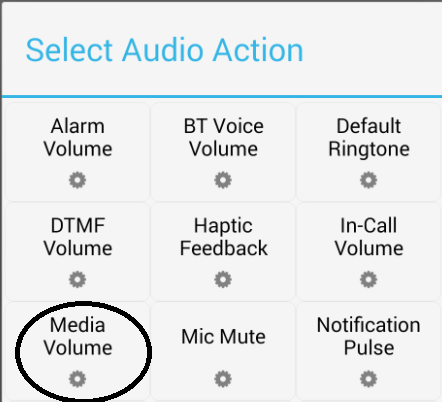
Step 5: Add a new action by pressing the + on the bottom bar. Select "Audio" action
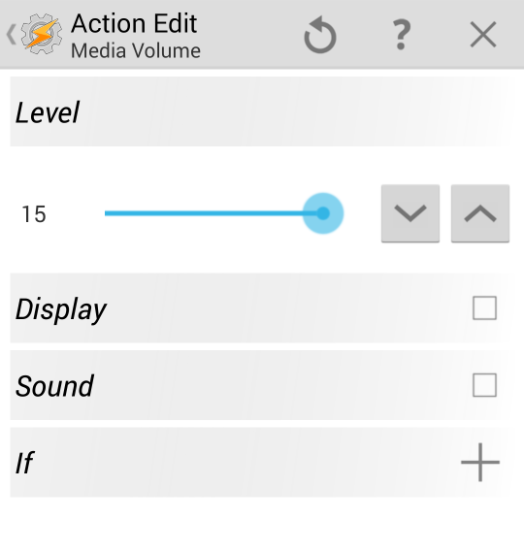
Step 6: Then "Media volume"
Step 7: Now just set the volume level to maximum and you've created a nice little tweak for your phone.


Monday, February 24, 2014

Fixing Aspire 3680 - No sound on headphone jack

I have an old laptop laying around, an Acer Aspire 3680. It's been a thrusty companion for the years i used it. But about a year ago i replaced it with another cheap, slightly newer office spec laptop. And since then my Aspire has mainly been gathering dust altho it's occasionally booted linux, to avoid dual booting my main machines.


But now recently i found a use for this laptop as a Youtube watching station for my treadmill. And so i flushed my linux install and spun up Windows 7 on it. Installed drivers and all was good. Until i mounted it  by my treadmill and plugged it to the speakers with the 3.5mm jack.
... and nothing happened. No sound.

After reinstalling drivers, newer drivers and googling a bit i found the solution to be odd, but simple:
Simply putting the computer to sleep.
After waking it up again the audio jack will work just fine.

The headphone jack will continue to work untill you restart the computer. Then you will have to put it to sleep again in order to use the headphones again.

Way back when i used the laptop for work i never turned it off, just put it to sleep, so chances are i this issue has always have been there without me noticing.

Tuesday, February 4, 2014

How to force SQL Server 2012 to do what you want

SQL is a pain.

I've been hating on it ever since i first was forced to use it, about a year and a half ago.
I first started out working with MS Access, and while SQL Server 2012 only sucks about half as much, it's still a sore and painful experience.
Now one of the worst things about SQL Server 2012 is that by default it requires you to be 100% flawless in you database design. You're not allowed to change a single thing after deploying the database, and if you try, then you get this error:

And being a grade A noob at database management i assumed there was no way around this. So i have been redoing entire databases from scripts way to many times now. And i must admit that i got a bit mad when i found the solution to this problem ;)

Just go disable this error dialog in:
Tools -> Options -> Designers
And uncheck "Prevent saving changes that require table re-creation"
And voila! no more silly errors!