Sunday, December 29, 2013

Update on the GIF creator (sharpGIFs 2.0)

Okay, so the last bit of code i wrote had the flaw of not letting the gif's loop.
It seems that for a gif to automatically loop you need to set some custom metadata for the file containing "NETSCAPE 2.0" for some reason. This probably dates back to looping gif's being first introduced in that very browser (GIF89a support).


The most intuitive fix for my program would be to just add this metadata to the GifBitmapEncoder before saving the file. However, for some reason this throws an exception "The designated BitmapEncoder does not support global metadata." Ironically it seems the GifBitmapEncoder is the only BitmapEncoder that doesn't support metadata.

So i was unable to actually fix my program. But luckily i found some code that works, using a different aproach to the problem (using MemoryStream and BinaryWriter).
The original code bit was found here, i haven't really done much in terms of changing anything. Just removing a reference to Response out and changing the delay time to something reasonable. Then i threw in the resizing bit from the last project.

So anyways, here are the code zipped as usual.
sharpGIFs 2.0.zip

And here are the final gif (same images as the post below, just looping this time around):


Thursday, December 26, 2013

Create animated GIF's with C#

I got a brand new camera this christmas, a GoPro Hero3+. The camera shoots amazing Full HD video at action-enabling framerates. And the waterproof casing and small form factor makes this the best damned piece of gear i own.

And after spending hours on hours of tumbling in the snow videoing myself fighting with the dog and jumping off cliffs skiing i started exploring the various other functions the camera has.

One of wich is the ability to take 30 pictures in 3 seconds.
Combined with a handy wifi-remote makes for alot of fun shots.

Then after having 500+ still frames of action recorded on the SD card i realized it would be fun making animated GIF's with them. A quick google search gave me lots of online-sites for just this purpose, but the first one i tried gave me a "picture too large" -error.

And being  the programmer i am, and having a few hours of post-christmas tranquility i immediately decided that i would rather make my own GIF-converter than manually resize my images to fit the online-converter.

Granted, the next few search results would probably solved my problem, but im allways trying to keep my coding skills from decay, and this presented it self as a good opurtunity.

So here is the result of a couple hours of dabbeling i Visual Studio:
The VisualStudio project can be downloaded as a .zip from this link

And a .gif example:


For some reason the gif will not loop, but im working on a fix for that.

Sunday, September 8, 2013

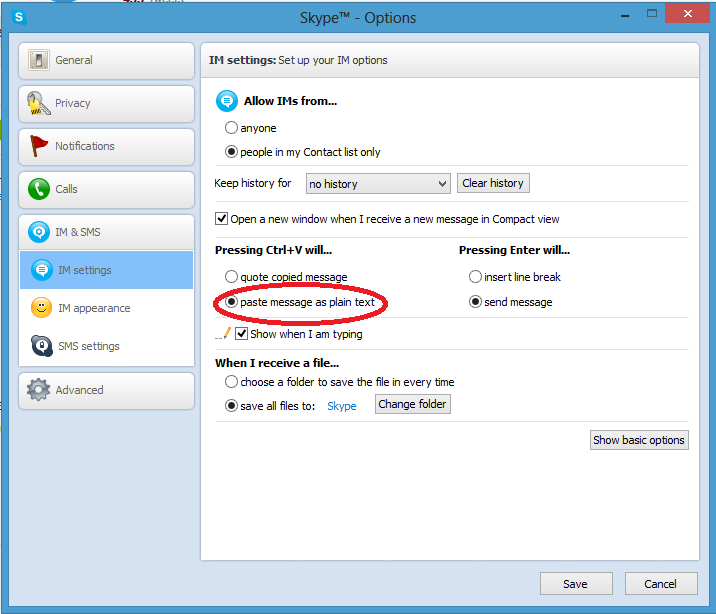
Finally got Skype to stop quoting my conversations

For many years i used MSN Messenger for instant messages. And with it i have tried alot of the alternative programs that connected with the MSN protocol, like Kopete, Pidgin and aMSN. Microsofts client was always full of ads and banners and retarded popup's. Along with unwanted features like nudges that made the whole screen vibrate and was particulary annoying if you had friends running any of the competing clients that had a reduced nudge-delay allowing them to spam your computer with shaky windows and twelve dosin doorbells going off.

All the competing clients worked well, had added functionality and no ads. But none of them ever got the emoticons right And while that's not a big deal for me now, it was very important when i was 13 and ended every line with a corresponding facial expression. Kopete had such bad smileys for a while that i got unsure about my friends actual attitude in the conversation. Like, "is he really smiling, or is that sarcasm. Shit that smiley lookin like John fuckin waterhead Kerry".

Microsoft then introduced Windows Live Messenger. A great example of shitty software.
First off all, the program it self was just a rebranded MSN Messenger. No added/fixed nothing.
New commercials now using Flash instead of gifs providing another 50mb of wasted RAM.
The installer was a new Windows Live installer. Wich was a great improvement. This way you would get 5 pieces of rubbish with every install, and shitty toolbars and bookmarks with your shitty Messenger.
The new installer also featured the ability to waste upward of 10 minutes on the install process, even with quad core computers. The installer also managed to rise to a size just shy of 120mb. Amazing, simply amazing.

I quote some random dude:
"Anyway, went to install this Windows Live messenger thing on there and it took absolutely AGES to install, and by the way I mean ages, nearly half an hour in fact it was so slow"

To compare, the latest version of pidgin is 9.1mb, supports 14 other protocols and installs in about the same time is takes to sneeze.

So as a last "fuck you" from Microsoft they terminated the entire Live Messenger and bought Skype as a replacement so they could ruin that as well.

Now i never really used Skype in the past, but i do now, and yes. It does kinda suck.

But now to the point of all this:
As i frequently discuss code with people on Skype i have been really annoyed by Skype's shitty attitude towards me copying text from my messages. Skype obviously thinks im a real journalist, and not just a dipshit blogger, and therefore types up the text as a quote like: "08:30 Sunday: Dick says: #1c3923 " when im really only after the color green.
I have been going on rants about this for weeks, thoroughly giving this software the finger, but then...
Turns out, it is possible to change this


Fuck i feel stupid.

Saturday, August 24, 2013

Surgon simulator 2013


Just recently tried out this game. It's available from Steam for download.
This is not a good game, but an amazing joke!

Experience the thrill of doing doubble kidney transplants and heart transplants while in the back of a speeding ambulance!


Thursday, June 6, 2013

Create .ico icons easy

In my last post a presented some work i did, and there is one thing i thaught i would shed a bit of light on, and that is icons.
I used mspaint to create my graphix this time, i'm a fan of Photoshop but for creating a simple icon like mine paint is a ok enough. And of course, Photoshop cost at least an arm and a leg, meaning less money for keg.

However, mspaint cannot simply save your image as a .ico file. And no, you cannot simply rename your .jpeg's either.


But there is a web service for just this, and it's free. It's http://convertico.com/ I have used it alot, and it's just great. And again.. FREE.
So, just save your file as .png and slam those .png's onto the webpage. And it will return you your .ico file within seconds, simple as that.

Wednesday, June 5, 2013

cAlarm

I just finished a project of mine. I ended up calling it cAlarm. It's and alarm clock capable of multiple alarms with repeat function for specific days of the week. When an alarm goes off it plays off a playlist of media files using winmm.dll, meaning it plays the media file as the form, but using whatever codecs you have on your system.


cAlarm implements a method for copying the files in a playlist to a folder. A feature i use all the time for copying music from my playlist in foobar2000 over to the USB drive i use in my car stereo. Foobar2000 is a great musicplayer btw.


The project also contains an example of serialization. Serialization is a way to save objects to files, and i have found it to be very useful and easy to implement. Im using it to save the list of alarms to a file, so the user can exit the program without loosing his alarms.


I have also tinkered around with some simple design features, like making a new-random color button that changes the layout's color to a random new one. Making all the forms have the same color when opened was something i didnt even consider untill now. Took abit of typing to get that integrated as well.


Tray icon is also in place. Alot more code than you would imagine.


So im putting this project up here so people can read the code, use the program, copy code, whatever really.

I still find faults and minor bug's every ten minutes i use this app, so what i upload here will probably be changed again in a few days and so on. The code is also rather sparse on comments at the moment, i might also fix that.

You can download the entire projectfolder as a .zip from this link.