Tuesday, January 13, 2015

Testing Windows 10 - Virtual desktops

Windows 10 is now out as a tech preview (for free) and im currently running it as my main OS, and have done so now for a couple of weeks. I will post a few things i've noticed as i get the time, first off:


  • Virtual desktops (sort off)
If you have used linux you probably know about virtual desktops, or if you have owned a ATI card with hydra vision (back in 2013 or so).
Now they have tried to adopt this into Windows but it's not the way you might know it from linux with totally separate desktops. This is more a way of minimizing/restoring apps in bulk (nothing disapears from the taskbar).

When running linux a few years ago i found this feature neat. But it didn't really improve my workflow, it rather just made my mess less visible and gradually hugging more and more ram in the background. This solution might be better in that regards, as everything stays on the taskbar so nothing is forgotten.

I've not yet been using this feature a whole lot but i like the idea.


Monday, January 12, 2015

Android not liking my certificates

At my local college you need to install and use a certificate for access to the WiFi network. This is a quite common thing, and is really no problem setting up. However when upgrading my phone's OS i ran into an issue with this annoing warning message:


Telling me that the certificate might allow strangers to snoop on my internet activity, while in fact the oposite should be true. Anyways the message is highly annoying, and pops up at every reboot.

Now the solution for this is to simply move this user installed certificate from the "user installed" - folder over to the "system installed" -folder. Since Android doesn't throw this warning for the system certs. This solution requires root.


Using a file manager with root access (I use Root Explorer) go to:
/data/misc/keychain/cacerts-added/


This is where you will find your user certs. Copy it over to this folder:
/system/etc/security/cacerts/


And you will no longer be bothered with this annoyance in the future :)


Tuesday, November 18, 2014

Visio frustration #1

Visio is a great tool for creating explanatory graphics in a hurry. Like the one below.

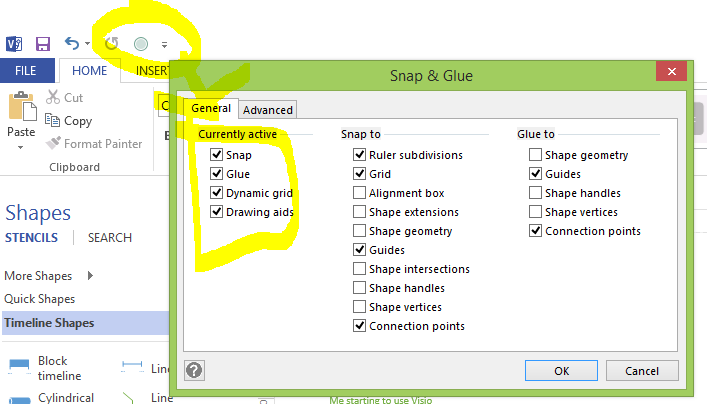
But one thing that has been botherin me alot is the constant snapping. Snap to grid and snap to object is fine, but snapping fucked up connectors to the middle of your object tends to fuck me over.
However i still got work done and never bother'd to look up how to turn it off. That is untill today, as i sat there spending more than 20 minutes(!) drawing a network diagram.

I will share that know-how:
1. Right click somewhere on the ribbon where there is free space
2. Customice Quick Access Toolbar...
3. All commands --> Snap and Glue --> Add --> OK


4. Voila! You now have a icon on what i assume is the quick access bar, click it!

5. All your snap and glue can now be disabled

Friday, October 17, 2014

OPC server not functioning? Turn on PUT/GET

I am currently working on a SCADA project consisting of a number of sensors, computers and Siemens PLC's interconnected with regular ethernet in a managed LAN.
Every PLC has some IO connected, some of witch are sensors that we also want to monitor outside of the PLC. The key element to this is the OPC server SIMATIC NET. This server talks to the PLC's, and makes the different tags available to other pc's.

This makes the OPC server really critical for the function of the other parts of the system.
I literally just spent days trying to get this up and running. Every option was set correctly, except this hidden "enable communication" setting on the PLC:


Monday, August 18, 2014

Removing severely rusty brake discs

Well, im not big on buying new and expensive cars, loaning money for buying a used car is a form of russian roulette that i don't play. This leads me to always be driving around in throwaway style whip's trying to squeze the most milage out before they can no longer pass the road safety test.

Anyways, my brake system looked like this:


Now im no mechanic, but ey, how hard can it be?

Most stuff about replacing brake parts was found on youtube, but i ran into some trouble when trying to replace the brake discs. 10 years of rust made it impossible to remove the old ones. Luckily the discs are made to be removed by design.

There are two extra holes in the discs. Simply screw any 8mm bolt in there, it will jack the disc straight off! Didn't even have to use a sledgehammer...


New discs, no problems

Sunday, July 13, 2014

Diskpart fixes broken USB thumb drives

Ever used a thumbdrive for some funky stuff, like shipping a PS2 bootloader or a linux distro and afterwards your drive reports to only being a fraction of it's original size?

A simple format will often fix that, but this time i wasn't so lucky. Even in computer management it was impossible to format the unallocated space.


But there is another tool in the shed, and it's called diskpart.


Simply type diskpart in CMD to start it.
Then follow the procedure below to clean the master boot record on your device and replace it with a fresh new one.

Be aware that choosing the wrong disk in this dialog will ruin your day.
But once that is done you can go format the thumb drive like usual, and it's now back to it's full potential again.

Such space... wow!